第7步:现在我们可以更改坐标来控制 glorp的位置。
- 将 .go_to() 指令中的第一个数字(x坐标)更改为100 。
- 将 .go_to() 指令中的第二个数字(y坐标)更改为 -125。
To navigate the page using the TAB key, first press ESC to exit the code editor.
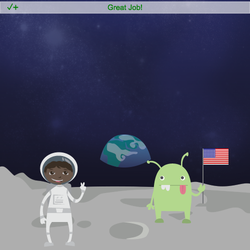
第7步:现在我们可以更改坐标来控制 glorp的位置。
To navigate the page using the TAB key, first press ESC to exit the code editor.
Your micro:bit is not set up for this program. Follow these steps to use your device with Codesters:
Your micro:bit has an old version of the Codesters binary file. Follow these steps to update the file on your micro:bit:


Warning: This will erase any existing program on your micro:bit.
Having trouble? Check out the micro:bit instructions to update your firmware.
Setting up your micro:bit
Calibrate your micro:bit by tilting it until all the LEDs are lit.
For a demonstration see the micro:bit calibration instructions.
Try the following steps to connect to your Micro:bit:
1. You may need to reload this page and try your program again.
2. Try disconnecting and reconnecting your Micro:bit. Then reload the page and run your program again.
3. If you are still having problems your Micro:bit may have an old firmware version that is incompatible with Codesters.
To update the firmware follow these Micro:bit instructions.

Are you already running a Codesters project in another tab or window?
Micro:bit can only connect to one web page at a time. Try stopping other Codesters projects or closing other tabs or windows that may be using your Micro:bit.
If that doesn't fix the problem try disconnecting your Micro:bit, reloading this page, and reconnecting your Micro:bit.
Status: Connected!
Status: Connecting...
Status: Still connecting...
Status: Failure
Status: Not Found
Is your Micro:bit connected?